Overview
This project explores how data is generated, stored, and accessed in cloud source systems before it enters a modern data pipeline. It combines:
- A NoSQL data layer on AWS DynamoDB using Python/Boto3.
- A relational data pipeline using RDS PostgreSQL, EC2 bastion hosts, and S3 for file-based ingestion.
The focus is on data modeling, connectivity, and security: VPCs, security groups, IAM permissions, and bulk data loading.
Architecture
- AWS DynamoDB – key–value/document store for product & forum data.
- AWS RDS (PostgreSQL) – managed relational database.
- Amazon EC2 – bastion hosts used to connect securely to RDS.
- Amazon S3 – object storage for CSV files used as ingestion source.
- Python + Boto3 – automation and file transfers.
- psql – CLI for interacting with PostgreSQL.
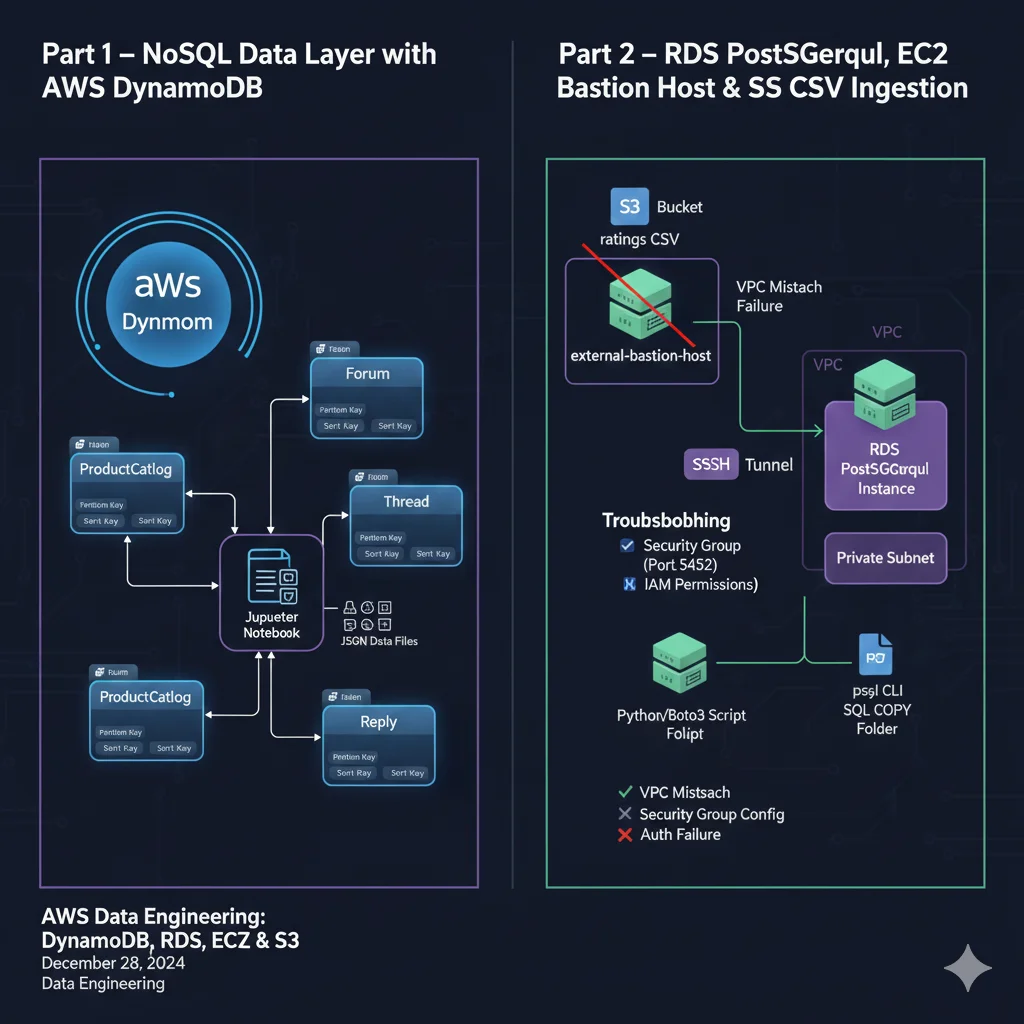
Part 1 – NoSQL Data Layer with AWS DynamoDB
I implemented a small NoSQL backend on AWS DynamoDB using Python and Boto3, running everything from a Jupyter notebook.
Data model
Modeled an e-commerce + forum system with four tables:
-
ProductCatalog
- Primary key:
Id(partition key) - Stores product information for an online store.
- Primary key:
-
Forum
- Primary key:
Name(partition key) - Tracks forums plus thread, message, and view counts.
- Primary key:
-
Thread
- Primary key:
ForumName(partition key) +Subject(sort key) - Represents discussion threads within each forum.
- Primary key:
-
Reply
- Primary key:
Id(partition key) +ReplyDateTime(sort key) - Stores individual replies, authors, and timestamps.
- Primary key:
Implementation
-
Programmatic table creation
- Used
create_tablewithAttributeDefinitionsandKeySchema. - Wrapped calls in a helper function that accepts
**kwargsfor flexible configs.
- Used
-
Data loading
- Parsed JSON sample files.
- Inserted data using
put_itemandbatch_write_item.
-
CRUD operations
- Create: Inserted single and batch items.
- Read: Used
get_item,scan, andqueryto:- Fetch products by ID.
- List threads for a forum.
- Retrieve replies for a specific thread.
- Update: Used
update_itemto increment view and reply counts. - Delete: Removed items with
delete_item.
Takeaways
- NoSQL data modeling with simple and composite keys.
- Understanding how partition keys and sort keys shape access patterns and scalability.
- Practical use of Python + Boto3 to manage DynamoDB programmatically.
Part 2 – RDS PostgreSQL, EC2 Bastion Host & S3 CSV Ingestion
The second part of the project focuses on a classic ingestion pattern: load data from S3 into RDS PostgreSQL from an EC2 environment, and solve the connectivity and permission issues along the way.
Goals
- Connect securely from an EC2 bastion host to an RDS PostgreSQL instance.
- Create a ratings table using SQL DDL.
- Download a CSV file from S3 to EC2 with Python/Boto3.
- Load the CSV data into RDS using
COPY. - Diagnose and fix common networking and IAM problems.
Environment
- RDS PostgreSQL instance as the target database.
- Two EC2 instances:
external-bastion-host(different VPC).bastion-host(same VPC as RDS).
- S3 bucket hosting the ratings CSV.
- Tools:
psql, Python, Boto3, AWS console.
Networking & security troubleshooting
I worked through several realistic failure modes:
-
VPC mismatch
- Initial connection from
external-bastion-hostsilently failed. - Root cause: EC2 instance and RDS database were in different VPCs with no peering.
- Solution: Use a bastion host EC2 instance deployed in the same VPC as RDS.
- Initial connection from
-
Security group configuration
- Connection from the correct VPC still failed.
- Root cause: RDS security group only allowed traffic from its own group; EC2 used a different security group.
- Solution:
- Edited the RDS security group inbound rules.
- Opened port 5432 (PostgreSQL default).
- Restricted the source to the EC2 instance’s security group (avoiding
0.0.0.0/0).
-
Authentication failure
- After fixing networking, received “password authentication failed”.
- Root cause: outdated database password.
- Solution: obtained updated credentials and reconnected successfully.
Building the ingestion flow
Once networking and security were resolved:
-
Created the table
- Downloaded
ratings_table_ddl.sqlto EC2. - Connected with
psqland ran\i ratings_table_ddl.sqlto create theratingstable.
- Downloaded
-
Downloaded CSV from S3
- Configured a Python script (
download_from_s3.py) using Boto3. - First attempt failed due to S3 bucket policy denying
GetObject.
- Configured a Python script (
-
Fixed S3 permissions
- Inspected the bucket policy and replaced a “deny all” configuration.
- Applied a new policy allowing
s3:GetObjectfrom the EC2 bastion’s IP / security context. - Re-ran the script and successfully downloaded the CSV into a local
data/folder.
-
Loaded data into PostgreSQL
- Used a SQL file containing a
COPYcommand pointing to the CSV. - Executed it via
psqlto bulk load the data intoratings. - Verified the load with
SELECTqueries.
- Used a SQL file containing a
Takeaways
- Designing and operating both NoSQL (DynamoDB) and relational (PostgreSQL) source systems on AWS.
- Connecting services securely with:
- VPCs, subnets, and security groups.
- Correct database ports and least-privilege access.
- Managing S3 bucket policies and IAM permissions for data ingestion.
- Using psql and SQL
COPYto bulk-load data from files into RDS. - Systematic troubleshooting of cloud connectivity and permission issues end-to-end.
Key Skills
- AWS: DynamoDB, RDS (PostgreSQL), EC2, S3
- Networking: VPCs, security groups, database ports
- Security: IAM principles, S3 bucket policies, least-privilege access
- Programming: Python, Boto3, SQL,
psql - Data Engineering: source-system modeling, ingestion from object storage, troubleshooting data pipelines